Getting Started with Ascend's Accounting Features
Last updated: September 25, 2026
This is a guide that will teach you:
How-to guides for basic accounting workflows
How to navigate each tab of the Accounting Dashboard, including
Pending approval
Balance
Payables
Receivables
Bank Transactions
Company payables
Incoming payments
Payment disputes
Refunds
Summary of what can be downloaded from each page
Ascend's accounting dashboard is a powerful tool for managing your agency's financial operations, from making premium payables to your carriers/wholesalers, to issuing refunds to your insureds, to reconciling payments made via check or wire. This is a guide for how to use each tab within the dashboard.
For step-by-step guides with screenshots, click here
For an overview of reporting features, click here
This feature is only available to users with Admin or Accounting permissions
Pending Approval
The Pending Approval tab is used to edit and approve payouts to a carrier, MGA, and your agency before they are funded.
Each policy on a program has one payout that will require review from the agency's team. Please check out this article for a detailed walk-through of the Payout Approval process.
Balance (Your Agency → Ascend)
The Outstanding Balance tab lists any unpaid payables owed by your Agency to Ascend. Payables from your agency are owed for a variety of reasons, including:
Unearned commission: Sending unearned commission for a canceled policy.
Return premium: Sending return premium received by your agency for a policy processed through Ascend.
Transaction fee: Transaction fees covered by your agency on behalf of your customer (setting turned on by request only).
Unearned take rate: Sending pro-rated take rate back to Ascend for canceled financed policies.
To pay the outstanding balance, click on the Make payment button, select the account you'd like to make the payment from, or choose to add a new account for the payment.
For more information on making payments on the Balance tab, click here.
You can also sort the listed payables by due date, initiated date, cleared date, issue type, reason type, or status. All of this information can also be exported into a CSV. This is particularly helpful if you need to incorporate this data into another payment system.

Payables (Ascend → MGAs & Carriers)
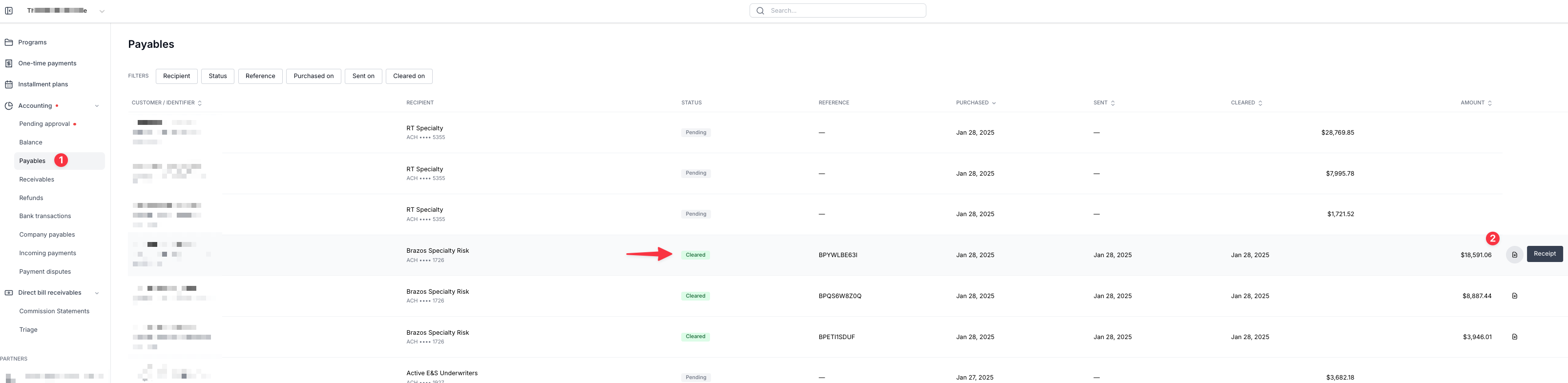
The Payables tab shows all the payments made by Ascend to Carriers and MGA/Wholesaler/Brokers on behalf of your agency.
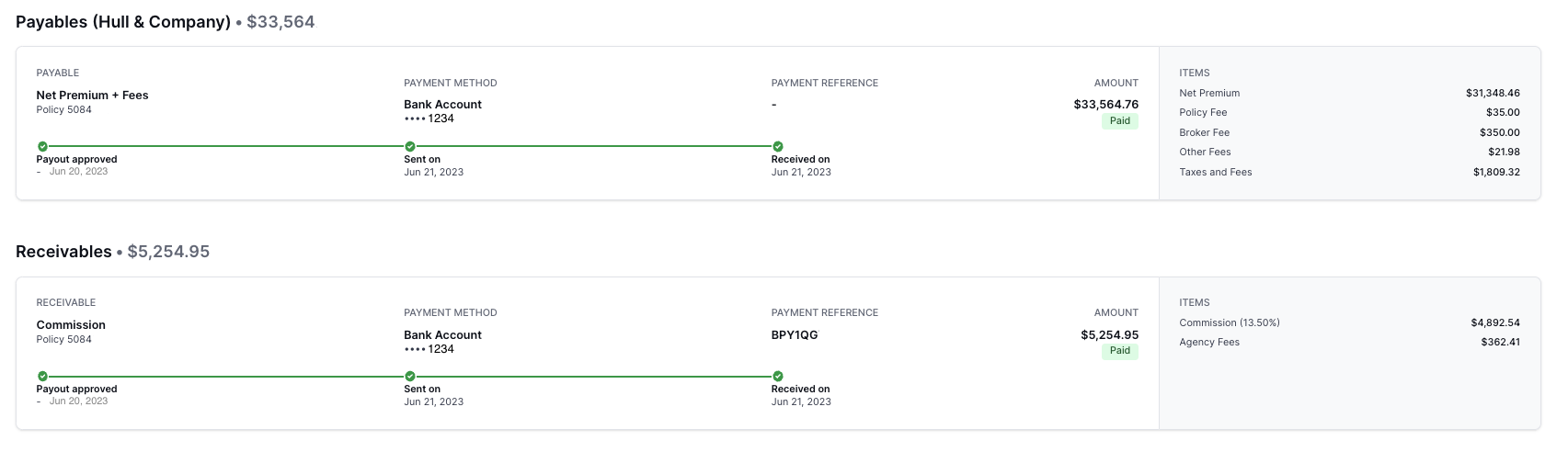
By clicking on a row, you can access the detailed view of the receivable that will show further information about the payment, including the funding timeline, policy breakdown, and the last 4-digits of the MGA or carrier account funded:
The filters on the page allow you to customize your view to narrow your search or locate a set of specific funding information:

To export a report of a filtered view or all agency payments, click the Export CSV button in the top right corner of the page. This will start the download of the agency payment records for reconciliation, planning, and other purposes:

To download a receipt for specific funding, click on the receipt icon on the far right end of the row for the relevant payable:
The carrier has also been directly informed by us when funding has been sent, and we send them a remittance report that includes:
Identifier, agency, insured_name, policy_number, memo, effective_date, carrier, wholesaler, financing_company, financing_account_number, paid_to, payment_method, net_amount, and sent_on.
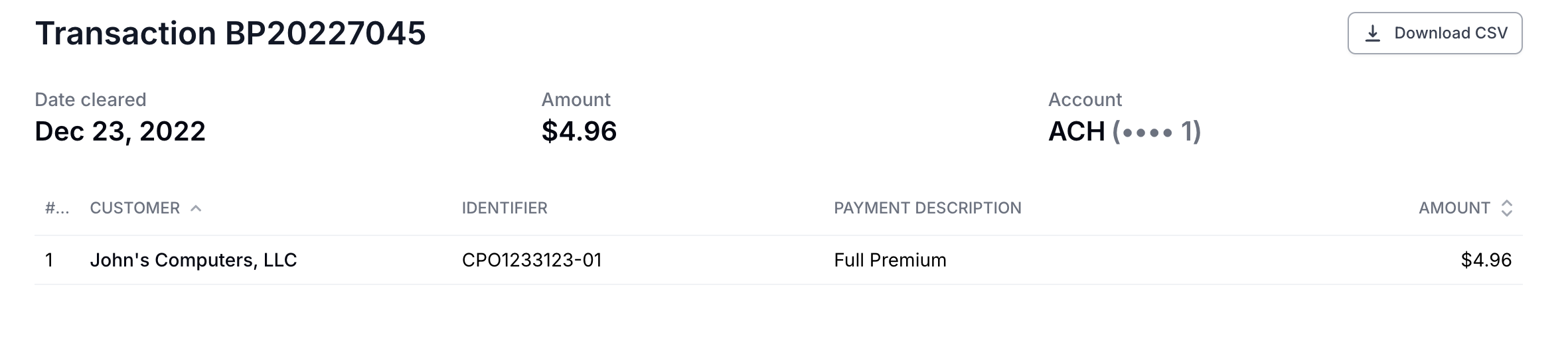
If you need a copy of the document that was sent to the carrier, select the transaction and then select Download CSV in the top right corner.
Receivables (Ascend → Your Agency)
The Receivables tab shows all the funds transferred from Ascend to your agency, along with details such as the account funded, the reason for funding, the relevant program or invoice, the amount, and the funding date.
By clicking on a row, you can access the detailed view of the receivable that will show further information about the payment, including details from the program where the payment originated. For commission and agency fee receivables, the policy number, any documents attached to the program's quotes, and the policy's carrier and wholesaler:

The filters on the page allow you to customize your view to narrow your search or locate a set of specific funding information:

To export a report of a filtered view or all agency payments, click the Export CSV button in the top right corner of the page. This will start the download of the agency payment records for reconciliation, planning, and other purposes:

Refunds (Ascend → Insured)
The Refunds section shows refund payments made to the Insured for policy cancellations, reducing endorsements, and loan overpayments. To learn more about refunds, see an overview here.
Bank transactions
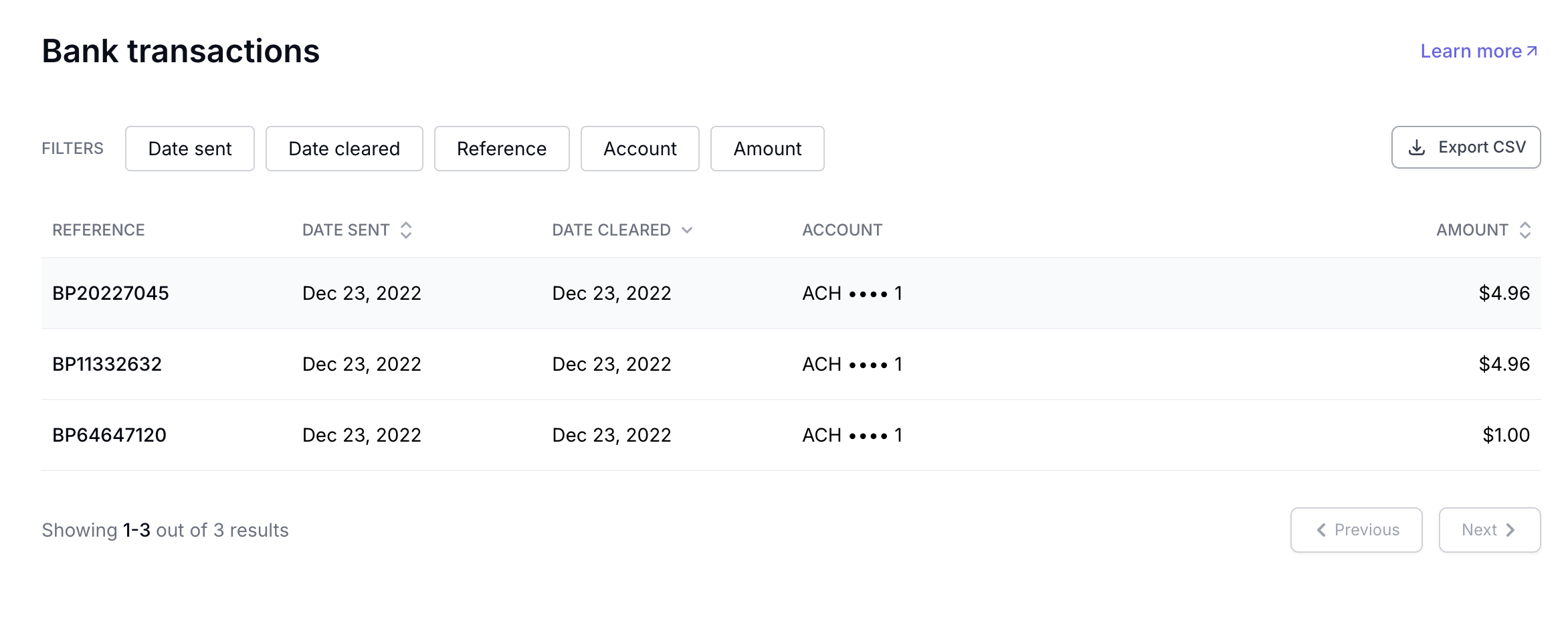
The Bank Transactions is a log of all deposits made into your agency's bank accounts, or withdrawals in the case you are paying a balance back to Ascend (for unearned commission, return premium, etc.). This unified view will include batch payouts by Ascend and batch payments made by you.
The list view will have columns for Reference, Date Cleared, Account, and Amount, with filters for easy navigation. Users can also export this data to CSV format.
To see policy/program-level detail on a single transaction, you can click on the row to expose a breakdown of the payments contained in the batch:
Company payables
The Company payables section shows aggregated payouts to your wholesalers/carrier.
Incoming payments (External check/wire payments → Ascend for your agency)
This feature requires check/wire payments to be enabled for your agency. To inquire about these features, please reach out to [email protected].
The Incoming payments section shows all check and wire payments coming into Ascend from insureds for invoices and program payments. Most wire payments are automatically reconciled when received, but at times, there are wire payments received that cannot be automatically reconciled/applied.
To reconcile a received payment, see the instructions here.
Payment disputes
Payment disputes raised by your customers will appear here. To learn more about the dispute process, see an overview here.
Summary of what can be downloaded from each page
Is there a CSV option | Purpose of the page | What is included in the CSV | |
Pending approval | No | to edit and approve payouts to a carrier, MGA, and your agency before they are funded | |
Balance | Yes | lists any unpaid payables owed by your Agency to Ascend. | Customer, Producer, Account manager, Coverage type, Effective date, Policy number, Carrier, Wholesaler, Gross premium, Premium, Commission, Agency fees, Surplus lines fees, Reason for transaction, Memo, Due date, Issue at (utc), Sent on (utc), Received on (utc), Payment method, Status, Amount, and Reference number |
Payables | Yes | shows all the payments made by Ascend to Carriers and MGA/Wholesaler/Brokers on behalf of your agency. | Identifier, Status, Customer, Reference, Payout amount, Sent on (utc), Cleared on (utc), Purchased on (utc), Approved at (utc), Recipient, Recipient account, Recipient billing address, Wholesaler, Carrier, Coverage type, Policy number, Billable type, Endorsement number, Remitance memo, Effective date, Producer, Base premium, Gross premium, Commission rate, Commission amount, Policy fee, Agency fees, Broker Fees, Taxes and fees, and Other fees |
Receivables | Yes | shows all the funds transferred from Ascend to your agency | Identifier, Statement descriptor, Status, Customer, Type, Reference, Payout amount, Sent on (utc), Received on (utc), Purchased on (utc), Effective date, Policy number, Billable type, Endorsement number, Remitance memo, Account type, Account, Producer, Wholesaler, Carrier, Coverage type, Base premium, Gross premium, Commission rate, Commission amount, Min earned rate, Policy fee, Agency fees, Broker fees, Taxes and feees, and Other fees |
Refunds | Yes | The Refunds section shows refund payments made to the Insured for policy cancellations, reducing endorsements, and loan overpayments. | Recipient name, Program ID, Policy number, Status, Payment method, Date sent, Date cleared, and Amount |
Bank transactions | Yes | The Bank Transactions is a log of all deposits made into your agency's bank accounts, or withdrawals in the case you are paying a balance back to Ascend (for unearned commission, return premium, etc.) | Reference, Date sent, Date cleared, Account, Amount, and Recipient |
Company payables | Yes | The Company payables section shows aggregated payouts to your wholesalers/carrier. | Reference, Date sent, Date cleared, Account, Amount, and Recipient |
Incoming payments | No | The Incoming payments section shows all check and wire payments coming into Ascend from insureds for invoices and program payments. | |
Payment disputes | No | Payment disputes raised by your customers will appear here |
FAQ
My agency received funds from Ascend and I'm not sure why, how can I look this up?
All payments from Ascend are listed in Bank Transactions: https://dashboard.useascend.com/accounting/bank-transactions. You can filter the page on "Amount" to search for the amount you received, and can click into each deposit for additional detail.
Contact Us
Need more help? Contact us at [email protected] for more help.