Add a New Carrier, Wholesaler, or MGA
Last updated: August 28, 2026
This is a guide that will teach you:
How Ascend tracks carriers, wholesalers, and MGAs
Add a new carrier or MGA to the platform
Define funding instructions to ensure accurate payouts
How Ascend Tracks Carriers, Wholesalers, and MGAs
Ascend maintains a database of over 3,000 carriers, wholesalers and MGAs, including their location, payment information, contact information, and payment preferences. We've been building and maintaining this list since Ascend was founded.
We track each location or "branch" of a company as a unique entry in our database and most of the largest companies (Travelers, RT Specialty, Amwins, etc.) are well-represented in our database.
Setting up the carriers and wholesalers your agency uses the most (we call this "favoriting") helps set your team up for fast data entry and reduced manual errors.
Favorite a Carrier or Wholesaler
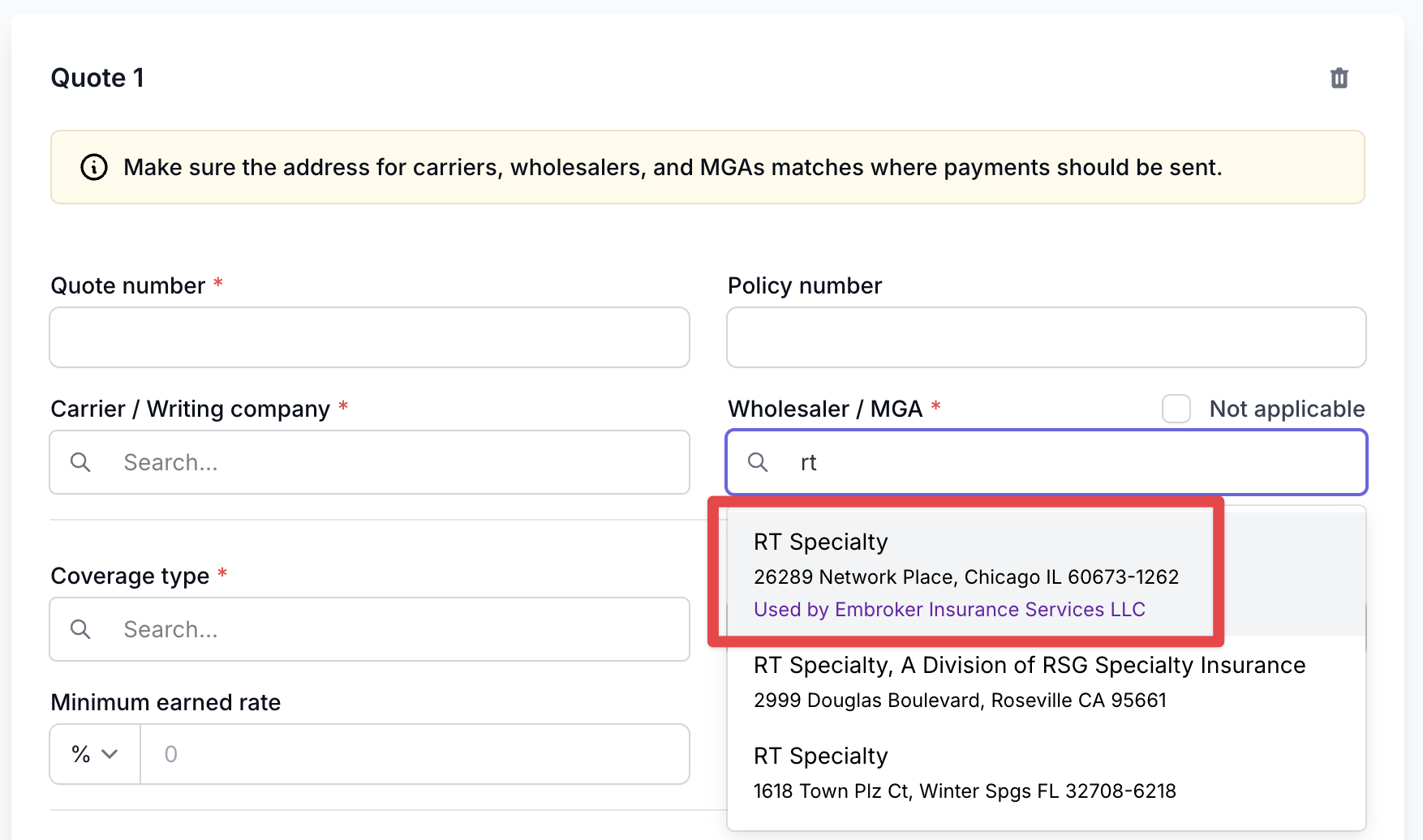
"Favoriting" a carrier or wholesaler makes it easier for your team to find them when creating programs in Ascend. When you favorite a carrier or a wholesaler, it adds the text "Used by [Your Agency] in the company picklist when someone on your team is creating a program. This allows you to differentiate the RT Specialty office that you work with from the hundreds of other offices that we track in our database, example below:
Step-by-step instructions - Producers
This feature is available to users with Admin, Accounting, or Producer permissions
Click "New Program"
Select the carrier or wholesaler dropdown, depending on the type of company you're attempting to create
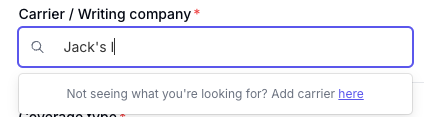
Begin typing the name of the company until you see the message "Not seeing what you're looking for? Add here"
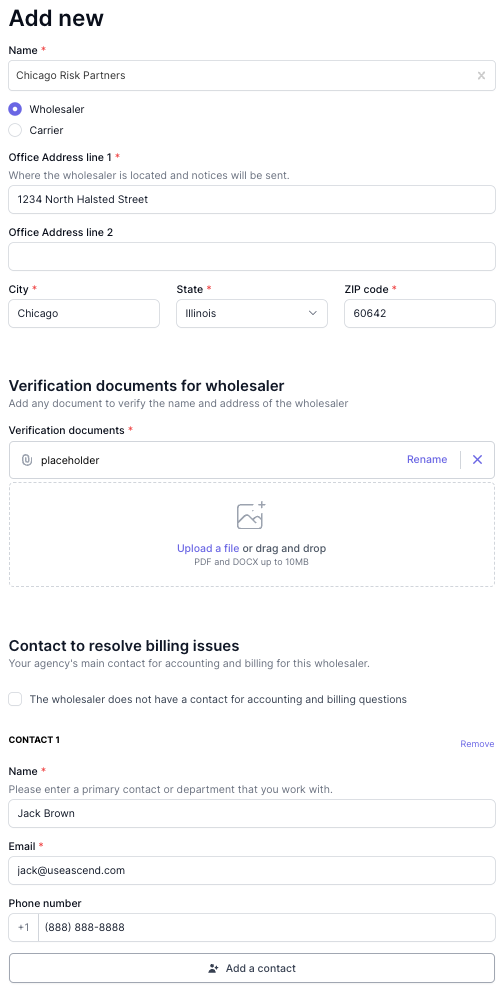
Enter the organization's details. Please include an invoice/statement that references the office address or includes remittance details. This will help us process the request as quickly as possible.
Click "Save"
Step-by-step instructions - Admins
This feature is only available to users with Admin or Accounting permissions
Go to the Wholesalers/Carriers section of your settings menu.
Click "+ Add new"
Search for the company you want to add - you can search by name or address
If the company is Ascend's database, click on the company, then click "Save"
This will pull this company up to the top of the Carrier/Wholesaler picklist when your team is creating a program.
Note the address of the company you select should match the address they provide on the invoices/statements they send to you
If the company is not already in Ascend's database, select "Create"
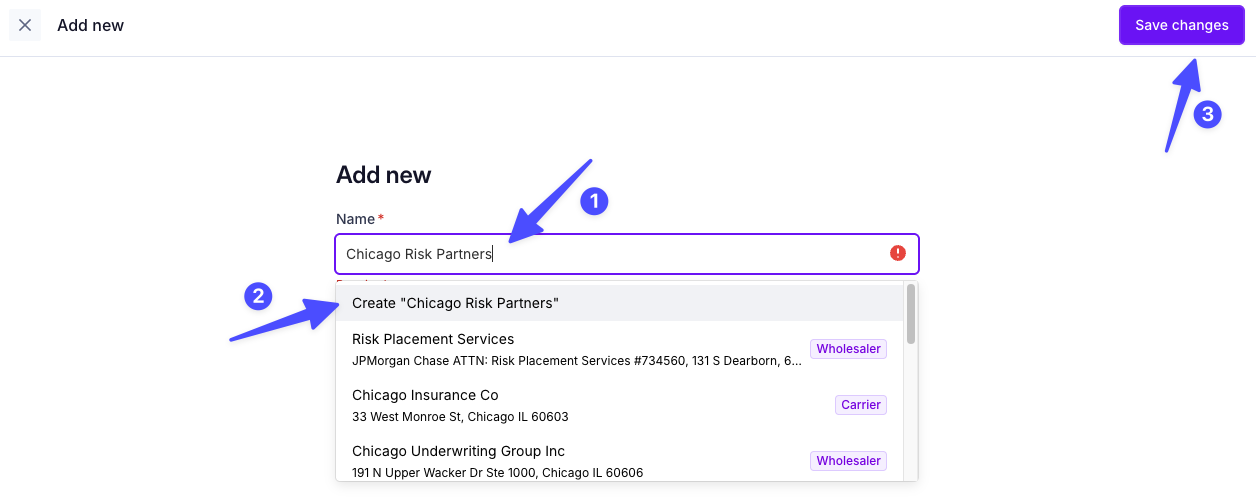
Enter the organization's details. Please include an invoice/statement that references the office address or includes remittance details. This will help us process the request as quickly as possible.
Click Save changes from the top right to proceed.
The favorited supplier will now appear to producers when creating programs to speed up entry and reduce errors.
New MGAs and carriers must be vetted and approved for financing by our team before we can offer financing on a policy through that carrier on a program. This requires our team to directly be in contact with the MGA or carrier. If you need to expedite this process, please contact [email protected] or your Ascend representative
Adding International Suppliers
Carriers and wholesalers can now be added with an international mailing address. The supplier form automatically adapts its address fields, phone input, and payment options based on the country you select.
Select Country - On the Add Supplier form, choose the supplier's Country from the dropdown (defaults to United States, pinned at top; other countries listed alphabetically).
Enter Address - For non-US countries, fill in the free-text State/Province/Region and ZIP/Postal code fields. Note: changing the country clears previously entered street, city, state, and zip fields.
Add Website - Enter the supplier's Website (https:// prefix shown) — now required for all new suppliers.
Add NAIC Code (Carriers only) - If supplier type is Carrier, optionally enter an NAIC code (up to 10 characters, recommended).
Enter Contact Phone - For non-US addresses, use the international phone input: select a country code (e.g. +44, +81) and enter the number in the free-text field.
Set Payment Method - On Add Payment Method, select ACH — Check is disabled for any supplier with a non-US address country.
Funding Details and Preferences
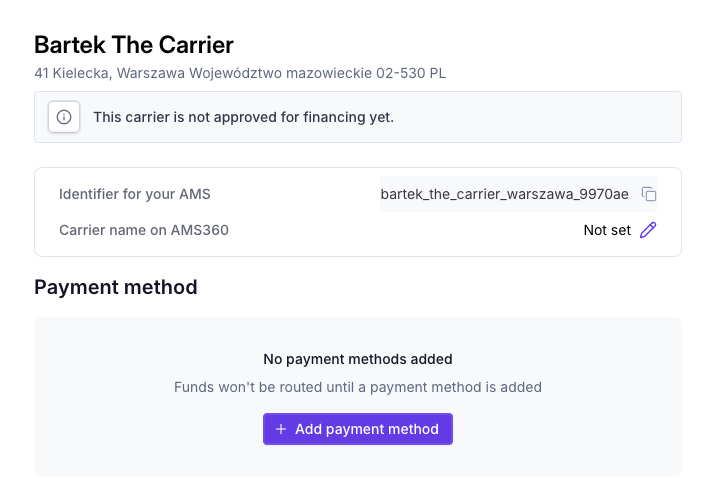
After saving a carrier or wholesaler, you will be directed to add their funding details. From this page, you can Configure payment methods, set default rates for commission, and manage underwriting contacts.
First, set up a payment method for the supplier. The remittance information inputted should belong to the carrier or MGA, not your agency. If the carrier/mga info you provide is not in our system or is different from what we have, the status will appear as "Pending" until approved in our system.
ACH is preferred, as funding times are faster than mailed check payments.
[Optional] Configure funding settings for how this supplier will be paid.
[Optional] Add additional billing contacts who may be useful for this carrier/MGA
FAQ
Why should I search before creating a new entry?
Ascend maintains a database of over 3,000 carriers, wholesalers and MGAs, tracked at the branch/location level. Creating a duplicate when the company already exists creates extra work and confusion.
What if I pick the wrong branch/location for a carrier that has multiple offices?
Make sure the address you select matches what appears on the invoices/statements they send you — Ascend tracks each branch as a separate database entry, so picking the wrong location can cause remittance mismatches.
If I add a new international carrier, does the vetting/approval requirement still apply
Yes — all new MGAs and carriers, domestic or international, must be vetted and approved by Ascend before financing can be offered on a policy through them.
Can I pay an international supplier by check?
No. Check is disabled on the Add Payment Method form for any supplier whose address country isn't US. ACH is preferred, as funding times are faster than mailed check payments — for international suppliers, ACH is the only option.
Contact Us
Need more help? Contact us at [email protected] for more help.