Creating Receipts for Payouts to Carrier/Wholesaler
Last updated: March 12, 2025
This is a guide that will teach you:
How to generate receipts to share with carriers/wholesalers who ask for proof of funding
Occasionally, a carriers, wholesaler, or MGA will send a notice or invoice to an agency requesting funding for a policy that has already been funded via Ascend. When this happens there are a few ways to provide this information.
Note that Ascend does not fund the carrier/wholesaler until the insured's initial payment has cleared. If the program is not in Active status, Ascend cannot pay the carrier/wholesaler.
Program Dashboard
If you visit the program page for the policy in question, you'll be able to see the status of funding by clicking the "Carrier/Wholesaler" tab of the transactions table:
If the status is "Cleared" this means funds have been sent to the company, and you can generate a receipt for the payment by clicking the download icon on the far right hand side of the table:
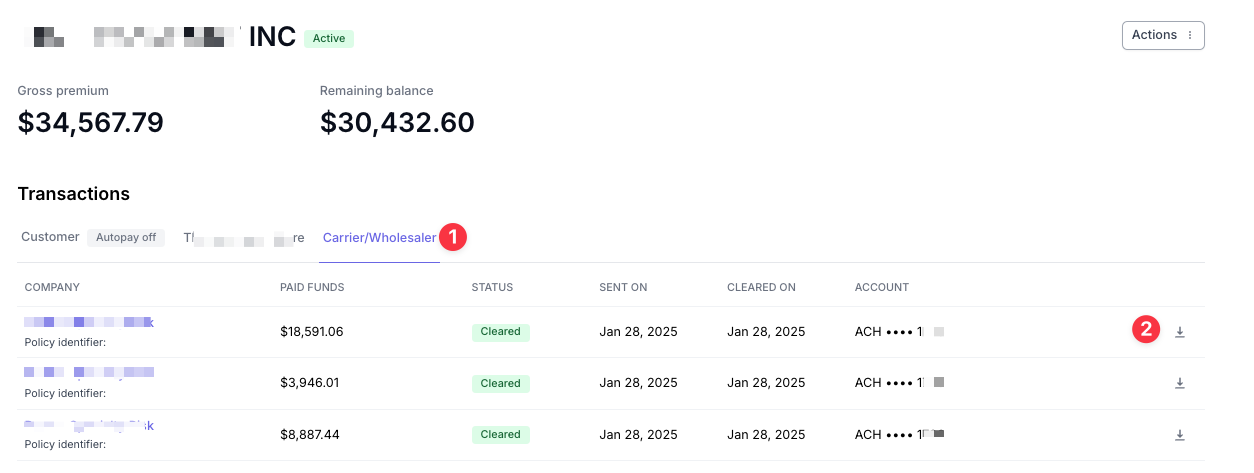
If the funding shows as "Pending", this means that either the payout hasn't been approved by your accounting team or the funds haven't yet been released by Ascend.
You can verify whether or not the payment has been approved by reaching out to your accounting team.
For more information on payout timing, please see here.
Accounting Dashboard
This functionality is only available to users with Admin or Accounting permissions
When this occurs, check the Accounting section of the program page for your insured:
To see a complete list of all payables issued by Ascend on behalf of your agency, you can visit the Payables tab of the Accounting Dashboard.
In the Payables section, you'll see a record of payments made by Ascend to Carriers/MGAs for this program.
You can generate a receipt for the payment by using the "Receipt" button on the far right hand side of the list.
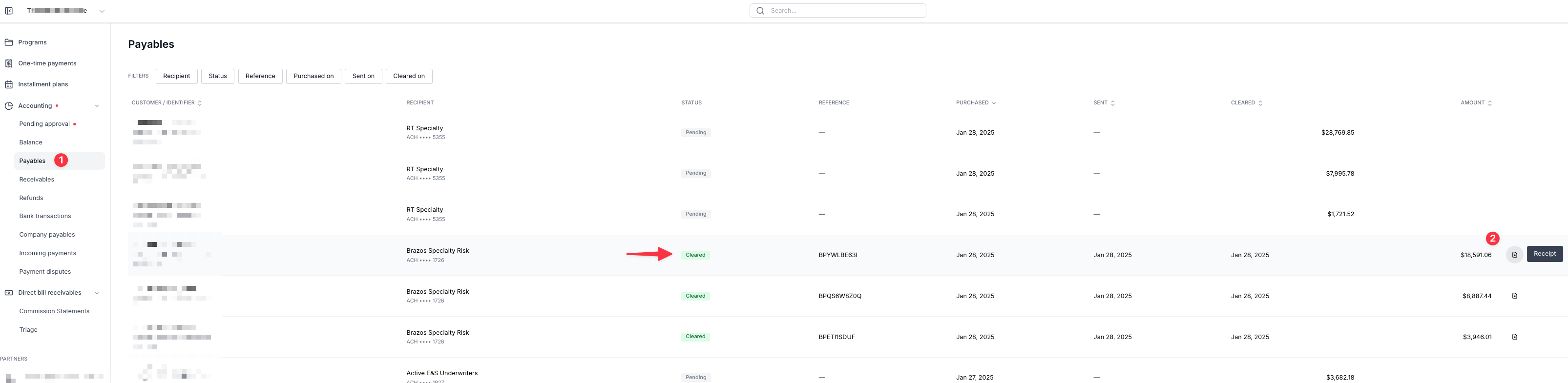
Receipts are only available for payment in "Sent" or "Cleared" status. If a payment is still pending, it either has not been approved by your accounting team or it hasn't yet been released by Ascend.
To verify if a payment is still pending approval by your team, you can visit the Pending Approval section here.
For more information on payout timing, please see here.
Contact Us
Need more help? Contact us at [email protected] for more help.