Updating the Accounting Month When Posting to Epic
Last updated: September 3, 2026
Direct Bill Automation
This is a guide that will teach you:
How to post old statements to an open accounting month
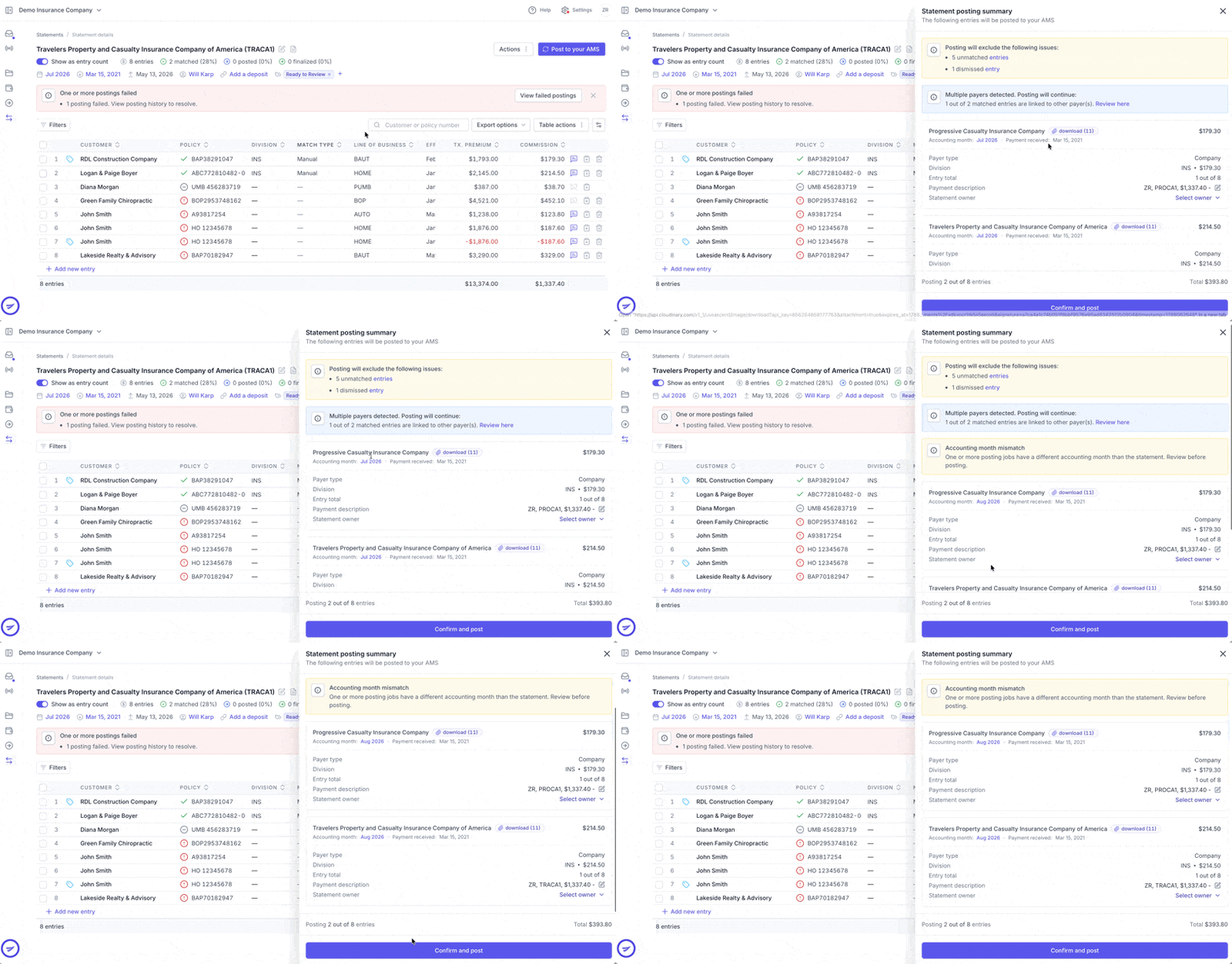
If a statement was received and matched in a prior accounting month, you must select an open accounting month before posting it to Epic.
For example, if a statement was received in July 2026 but is being posted after the July accounting period has closed, select an open accounting month, such as August 2026.
Click Post to Epic.
In the posting drawer, click the accounting month displayed in purple.
Select the appropriate open accounting month from the calendar.
Click Confirm and post.
Once confirmed, the statement will remain in its original accounting month in Ascend but will be posted to the selected open accounting period in Epic.
Frequently Asked Questions
Will changing the accounting month update the statement in Ascend?
No. The statement will remain in its original accounting month in Ascend but will be posted to the accounting month selected for Epic.
Which accounting month should I select?
Select the appropriate open accounting month. If you are unsure which month to use, confirm with your accounting team before posting.
Can I post a statement to a closed accounting month?
No. If the statement’s original accounting month is closed, you must select an open accounting month before posting it to Epic.
Contact Us
Need more help? Contact us at [email protected] for more help.