Dismissing Direct Bill Entries
Last updated: October 7, 2026
Direct Bill Automation
This guide covers:
When to dismiss a statement entry
How to dismiss an entry
How to remove a dismissed status
Overview
Dismiss an entry when it does not need to be matched, but you want to keep it visible on the statement for reference.
Dismissing an entry removes it from the statement total used for posting, allowing you to post the remaining relevant entries. The dismissed entry stays in your view and is marked with a dismissal icon.
Dismiss an Entry
Click the entry’s row to open the matching drawer.
Click the three vertical dots near the X in the top-right corner.
Select Mark as dismissed.
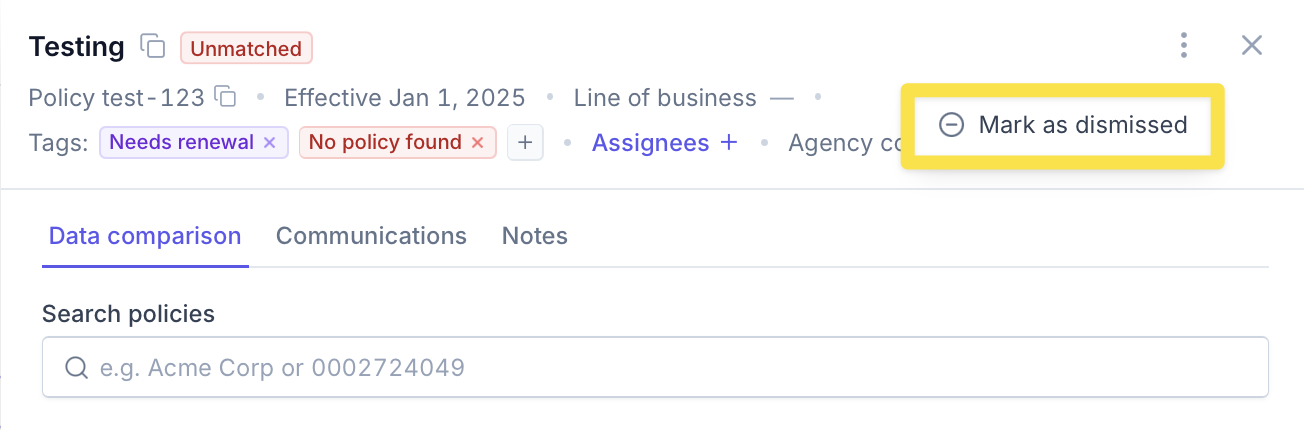
The entry will remain visible in the statement table with a dismissal icon.

Remove a Dismissed Status
If an entry needs to be matched and included in the statement total again:
Click the dismissed entry’s row to open the matching drawer.
Click the three vertical dots near the X.
Select Remove dismissed status.

The dismissal icon will be removed, and the entry will be included in the statement total again.
Contact Us
Need more help? Contact us at [email protected] for more help.