Refunds
Last updated: October 20, 2026
This is a guide that will teach you:
How refunds work
How to view refund activity
What each refund status means
How to view and track refunds on the Ascend dashboard
Turnaround time for each refund type
What refund emails your insureds receive
Edge case: sending refunds to your agency
NOTE: This article covers refunds that have already been issued. If you're looking for information on how to initiate a cancellation and refund, see our the Cancelation article here.
Overview
Ascend provides the Refunds tab so agencies can automate issuing refunds to the insured for policy cancellations, reducing endorsements, and loan overpayment. The filters located at the top of this section allow you to customize your view based on refund date, recipient type (if applicable), recipient, account manager, and current status.
This feature is only accessible to users with Admin or Accounting access
How Refunds Work
When a policy is canceled or a premium-reducing endorsement is processed, Ascend calculates whether a refund is owed to the insured. A refund is issued once all return funds have been received and any outstanding balance on the policy has been cleared. For financed policies, this means the refund covers the amount left over after the balance is paid off.
Once those conditions are met, Ascend initiates the refund automatically. In most cases, no action is required from your agency to approve these refunds.
Unless a member of your team with Admin privileges has selected that refunds over a certain amount or to be paid out via check need approval before being issued
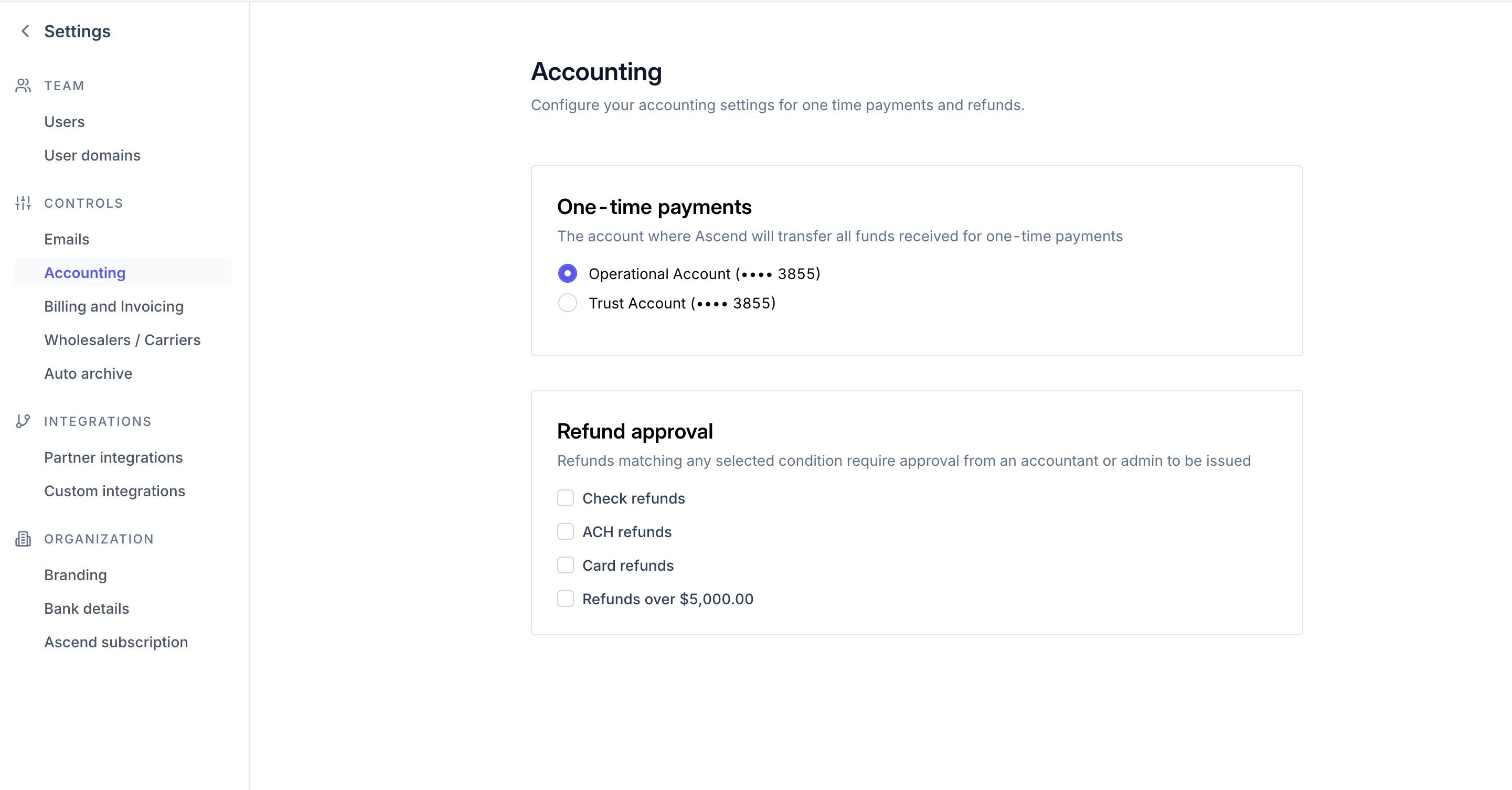
Refunds that need to be approved would be in the Refund tab and can be approved by members of your team with Admin or accounting access.
Ascend will not release any refund to a client while an outstanding balance is on that client's loan.
Refund Status
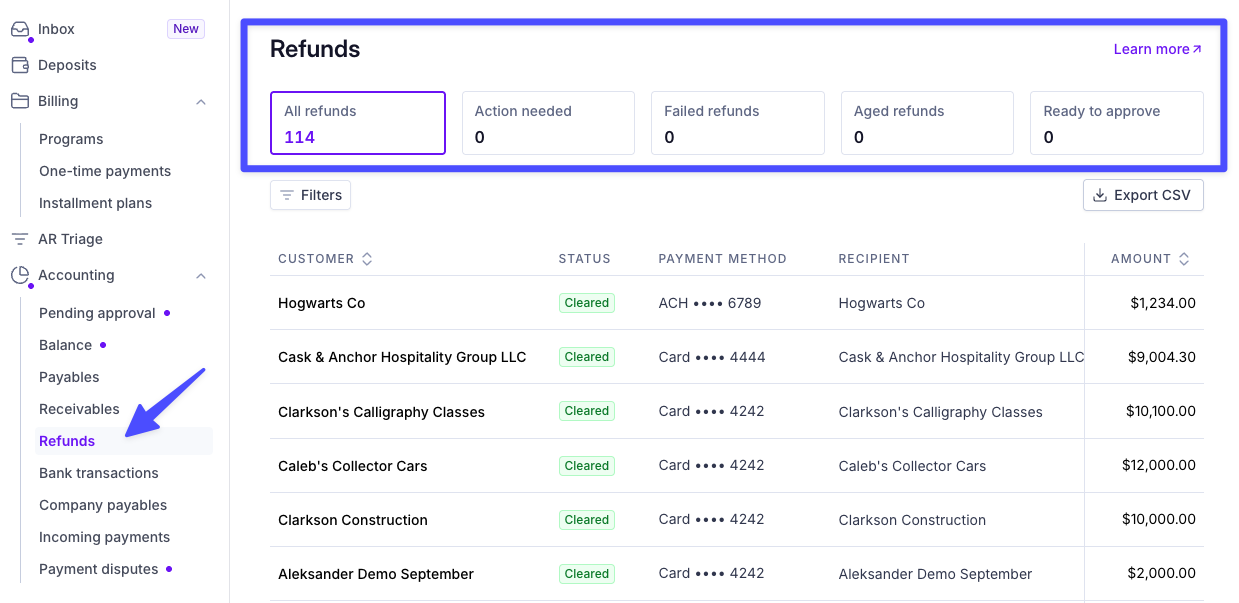
Each refund has a corresponding Status label, which automatically updates as the refund progresses:
Action needed: Refunds that don't have documentation that matches the insured's name and address. You will need to update documents with the right information to reissue the check to the insured.
Failed: refunds have been issued but failed for one of these reasons
Check uncashed - if a refund check was returned or remains uncashed for 90 days, Ascend will automatically cancel it (see reissuing refunds below for next steps)
Instructions change - a stop payment has been placed on the refund so that the mailing address can be changed
Reinstatement - a refund has been stopped because the policy is being reinstated
Aged refunds: refunds has been uncashed for more than 30 days
Ready to approve: refunds are in pending approval status and need manual approval before it can be issued. This feature is only available for some workspaces will have this feature
Pending: refunds have been approved and will be initiated soon. It will usually specify the ETA in the Initiated column
Initiated: refunds have been initiated to the insured
Cleared: refunds have been issued and successfully cashed
Blocked: Processing on hold temporarily reach out to [email protected] for assistance with these specific refunds
Viewing Refunds in Your Dashboard
You can track the status of all refunds from the Accounting → Refunds section of your Ascend dashboard.
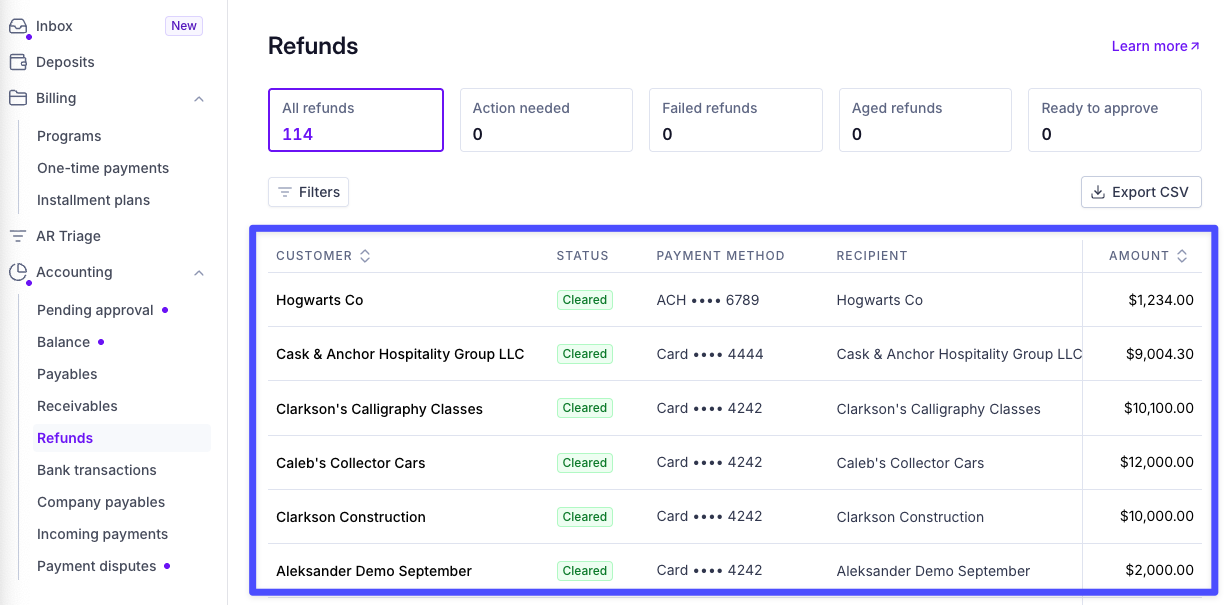
Each refund entry will show:
Insured name and policy
Refund amount
Refund method (ACH, card, or check)
Status (Pending, Processing, Paid, or Failed)
Estimated or actual payment date
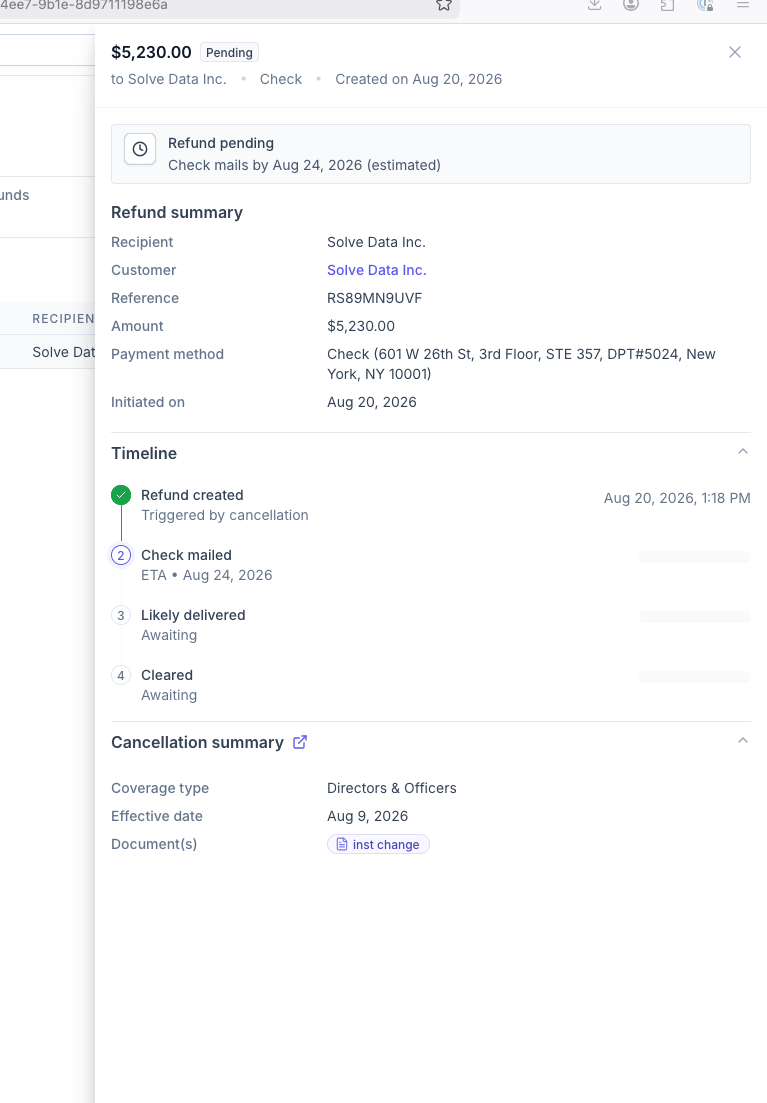
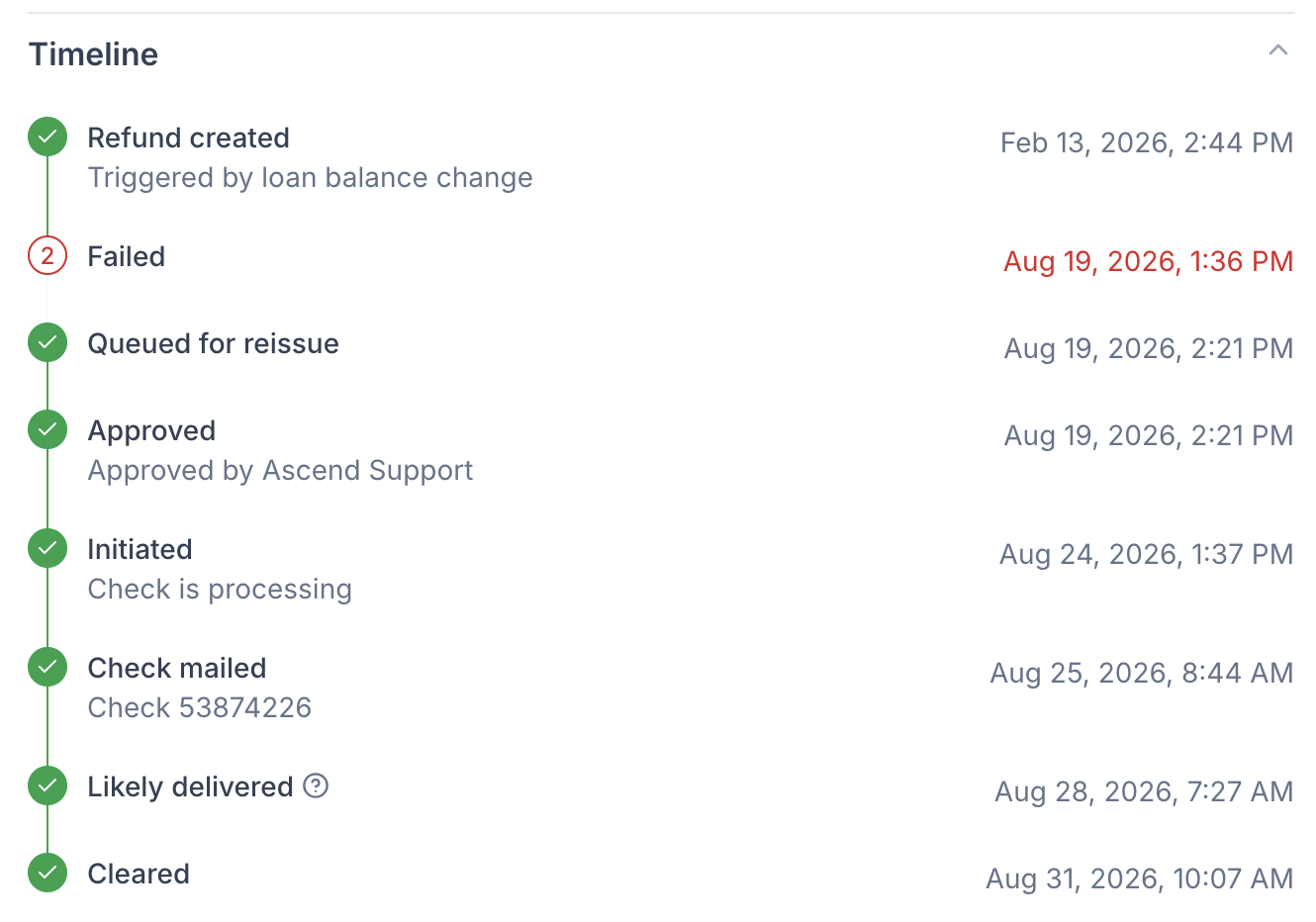
You can click into any refund to view full details, including the payment method on file and any notes from the Ascend team. If a refund was issued by check, you can also reissue it to an updated address from this view.
You will also be able to see a timeline of when checks were mailed and likely delivered
Refund Methods
The method used to issue a refund depends on how the insured originally paid and whether that payment can still be refunded.
Original payment method (ACH or credit/debit card)
Whenever possible, Ascend returns the refund to the payment method the insured originally used. The refund will go back to the original card or ACH account as long as the insured paid by card or ACH, the original payment was made within the last 165 days, and that payment method is still valid and active. This is the fastest option for the insured.
Check
If the refund cannot be returned to the original payment method, it will be issued by check to the insured's mailing address on file. This happens when the insured originally paid by check or wire, when the original card or ACH payment was made more than 165 days ago, or when the original payment method is no longer valid or active. Check is the fallback method whenever an original payment method refund is not available.
In some cases (the funds have not yet been issued), you will be able to select the payment method in the pop-out when you select the refund you need to investigate. The Actions tab at the bottom of the more detailed pop-out will show all of your available refund actions.
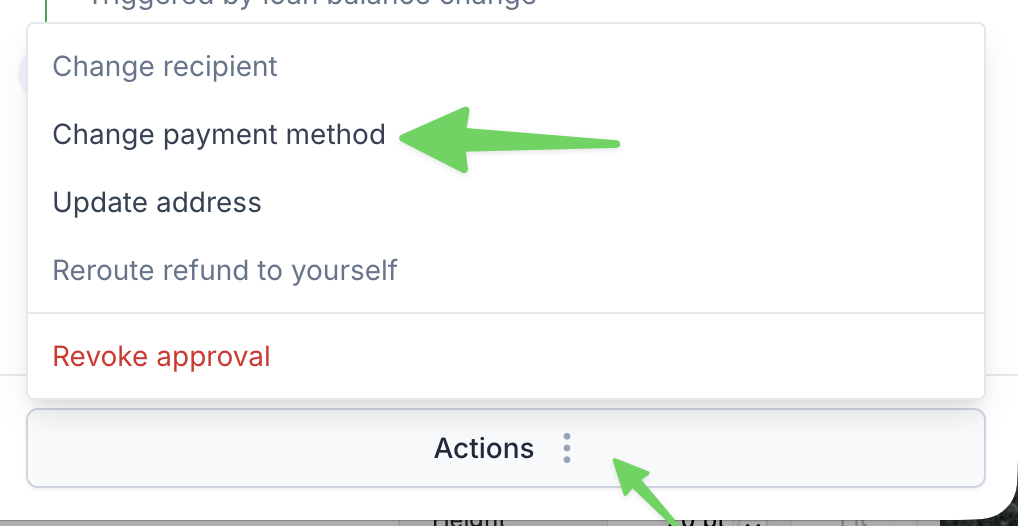
There is a limit of two reissues per refund. Reach out to support if you need assistance with a refund that has reached this limit
Timeline
Timing begins once all return funds have been received and any outstanding balance on the policy is cleared. Ascend displays the estimated receipt date on the refund confirmation screen when the cancellation or endorsement is initiated.
Method | Estimated Timeline |
Check | 7–14 business days |
ACH | 3–5 business days |
Card | 1-3 business days |
Note: Ascend is not able to stop a processing ACH transfer, but Ascend can refund the client immediately after the transfer completes.
Paid-In-Full
When a refund is issued for an overpayment in a Pay-in-Full (PIF) program, the typical timeline for the refund to be processed and returned to the insured's credit card is within 2 business days of the refund creation.
Refund Process
The refund is created in the system, usually due to an overpayment by the insured.
The refund should be automatically processed within 2 business days.
Note: The 2-business-day timeline applies to most situations, but there may be exceptions depending on specific circumstances or system issues. If a refund hasn't been processed within this timeframe, it's advisable to check with the support team.
Communications
Refund emails to the insured
Ascend automatically emails the insured when a refund is initiated and if a refund is stopped.
What the email includes
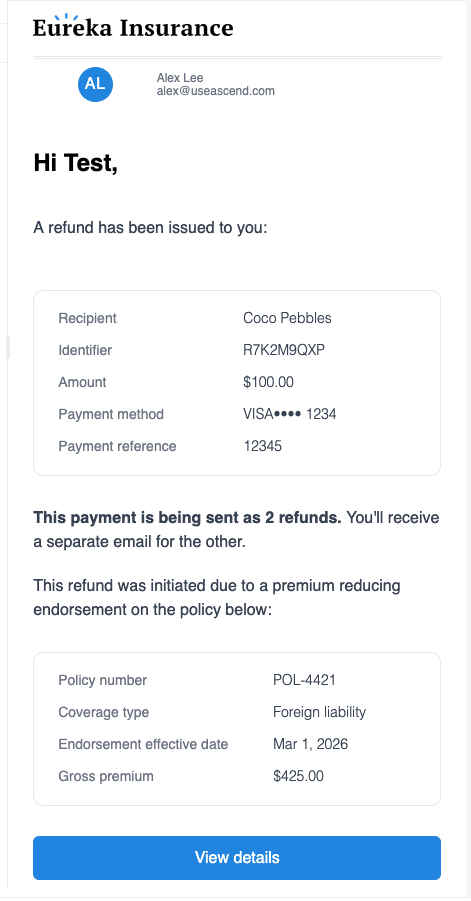
Refund summary: recipient, identifier, amount, payment method, and payment reference
Refund context (bottom): why the refund was initiated (for example, a premium-reducing endorsement) and the related policy details, such as policy number, coverage type, endorsement effective date, and gross premium
Refunds sent in two parts
In some cases, the total refund owed is sent as 2 separate refunds. When this happens, the email tells the insured that the payment is being sent as 2 refunds and that they will receive a separate email for the other one.
This happens when a financed policy is voided within the 50-day window, and the first installment funds have already been sent to the lender.
If an insured says they only received part of their refund, check whether their refund email mentions that the payment is being sent as 2 refunds. If so, the remaining amount will come as a separate refund with its own email.
Edge case: sending refunds to your agency
In the Refunds tab, when you select a refund, you may have the option to send the refund to your agency instead of directly to your client.
This is only available under the following conditions:
PIF program (not available if financed )
refund is not cleared or blocked
refund is a check that has already been issued.
When used, this will:
Cancel the refund (can no longer be seen by customer
Create payout to the org
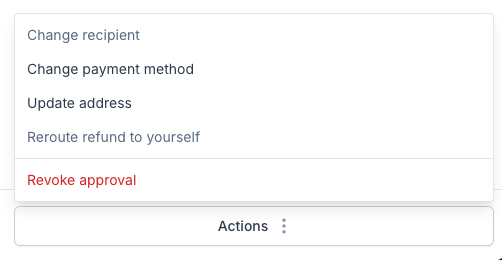
This option will be in the Actions at the bottom right of the page when the refund is selected:
Frequently Asked Questions
Q: Why hasn't the refund been issued to my insured yet?
Carriers typically take 30-90 days to return funds for canceled policies. Under all circumstances, funds must be returned to Ascend before any refund can be issued to your client.
Q: How is the refund method decided, and can I choose it?
Ascend automatically returns the refund to the insured's original payment method when that payment was made by card or ACH within the last 165 days and the payment method is still valid and active. If none of those conditions are met, the refund is issued by check to the mailing address on file. The method is selected automatically and cannot be chosen at the time of the refund. If the insured needs the refund sent a different way, contact [email protected].
Q: What if the refund fails?
When a refund fails or ages, you can reissue it to the same insured address or an updated address via the Actions button on the refund.
To update the address, you will need to provide a verification document that includes both the insured's name (on the quote/invoice) and the updated address. Once you hit Update and reissue, this will update the address on all pending refunds for the insured across all programs. See our Refund Check Change Requests here.
Q: Can I switch the refund payment method to ACH instead of check?
Yes, if your agency is on Ascend Plus you can submit a request to our support team to change the refund method from check to ACH. We will ask you to provide a copy of the insured's ACH info on their company or bank letterhead.
Q: Can I reinstate a policy after a cancellation refund has been issued to the insured?
It's depends on the carrier--please contact the carrier directly to verify if they will allow a reinstatement on the policy. If so, contact our support team to process the Reinstatement request in Ascend.
Q: If the insured overpays for the policy, and funds have yet to be disbursed to the Carrier/MGA, can we issue a refund to the insured?
Yes, you can follow these instructions to issue a refund to the insured
On the Pending Approval page, locate the policy and select Edit policy
Note: Only Admin and Accountant users have access to the Pending Approval page
Make corrections to the billed policy details
Select Update Policy to save the changes
Depending on the client's purchase method, either a refund will be issued, or their loan will be credited with installment amounts recalculated within 3 business days.
Q: What if a refund goes to a Canceled Card or account?
Please reach out to support to confirm if the transaction went through. If the transaction was completed, reach out directly to the bank the closed account was connected to. Depending on whether the accounts are still active, the bank may reissue the refund via check. If the payment fails to go to the other bank, we will reissue the funds via check as well.
Contact Us
Need more help? Contact us at [email protected] for more help.