Archive a Program in Ascend
Last updated: July 27, 2026
This is a guide that will teach you:
What happens when you archive a program?
How to archive a program
What Happens to a Program When Archived?
To keep the dashboard organized, users may want to archive or hide programs that are unsold or contain incorrect information.
Archiving a program has the following results:
Stops any emails from going out to the insured from that program.
Deactivates all related payment links. If the insured already has a URL, they can open the payment link, but it will not accept payment. It will appear to the insured as inaccessible.
Disallows edits made to any part of the program.
Only programs without any payments can be archived. Once a payment is made, the program cannot be archived.
How-to Guide
Step-by-Step Instructions
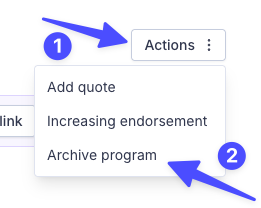
From the program view, click on the "Actions" button at the top right of the page.
Select the Archive program from the dropdown options.
Accessing Unarchived Programs
Archived programs don't show up in the Ascend homepage programs view. You'll need to use the search bar to locate archived programs.
Search for the archived program in the dashboard search bar by the program name, customer email, or policy number (if entered when the program was created)
Click on the program to open it.
To unarchive a program, click the Unarchive program button at the top right of the screen.
Unarchived programs can be edited, and payment links will be reactivated.
Frequently Asked Questions
What types of programs can I archive?
Once an insured has made a payment, the program cannot be archived. The program must be in "Payment Due" status in order to be archived.
Can I unarchive a program once I archive it?
Yes! To unarchive a program, follow the steps above under the Accessing Archived Programs section.
Can insureds still make payments on archived programs if I sent the payment link already?
Archiving the program deactivates all related payment links. If the insured already has a URL, they can open the payment link, but it will not accept payment. It will show to the insured as inaccessible.
Contact Us
Need more help? Contact us at [email protected] for more help.