Premium-Reducing Endorsements
Last updated: May 7, 2026
This is a guide that will teach you:
When to create a premium-reducing endorsement
How to create a premium-reducing endorsement
What happens next after endorsement creation
FAQs
An endorsement is a change to an existing insurance contract that changes the funds and/or terms of the original policy. There are two types of endorsements:
Premium increasing
Premium reducing
This article is about premium-reducing endorsements. For information about premium-increasing endorsements, check out the article here.
What is a premium-reducing endorsement?
A premium reducing endorsement is an amendment to an existing insurance contract that changes the terms of the original policy and lowers the total premium owed, typically by modifying or removing certain coverages, reducing limits, or changing policy terms.
What it does
Amends the original policy to reflect a reduction in coverage scope, insured value, or risk exposure
Results in a return premium (money owed back to the insured) or a lower ongoing premium
Common reasons for one
Removing a vehicle, property, or covered item from the policy mid-term
Reducing coverage limits
Changing a classification (e.g., a driver moves to a lower-risk category)
Canceling a portion of a multi-line policy
In premium finance
This is especially relevant in premium finance contexts. When a premium-reducing endorsement is issued on a financed policy, it can affect the loan balance because the total insured premium decreases. This may trigger:
A return premium that gets applied to the loan balance
A recalculation of remaining installments
Potential overpayment situations if the loan has already been funded at the original premium amount
Key distinction Unlike a cancellation (which ends the policy), a premium reducing endorsement keeps the policy active — it just modifies the cost and/or coverage going forward.
Step-by-Step Instructions
Navigate to the relevant program page in the dashboard.
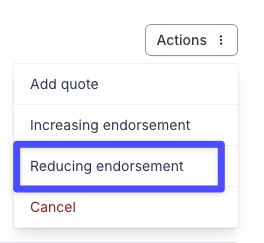
Click the Actions button on the top right corner and click Increasing endorsement.
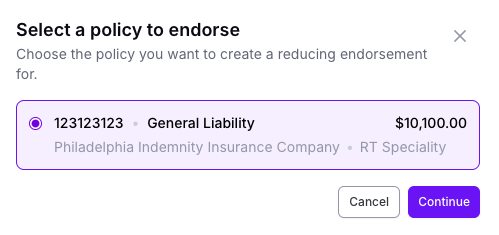
Select the policy to be endorsed, then select Continue.
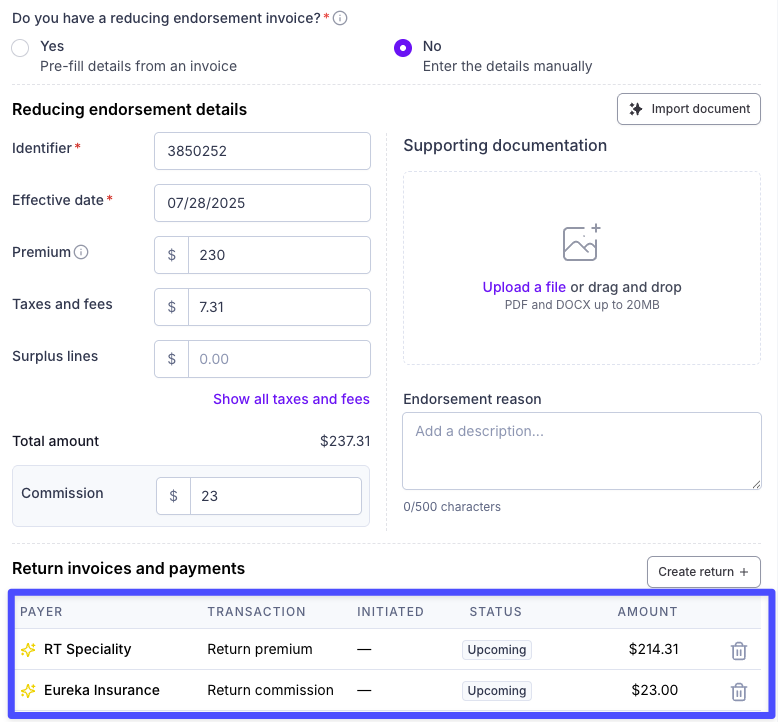
Enter the relevant endorsement details provided by the carrier, such as the total amount of reduction, effective date, etc. This will generate the invoices for the returns at the bottom of the page.
Click the Create Endorsement button (top right).
✅ You've created the endorsement!
What happens next?
This will create an item in the Balance tab for your accounting team to pay (https://dashboard.useascend.com/accounting/balance). This transfers funds from your agency to Ascend, at which point Ascend will initiate the refund to the insured.
If the policy is financed, all return premiums will be applied to the loan balance, which will lower the loan balance. This will result in lower monthly payments. Monthly payments are typically updated within 5 business days of Ascend receiving the return premium. Please reach out to [email protected] or escalate your chat if you notice any issues.
If the policy was paid in full, the return premium will be refunded directly to the insured according to the following logic
If the original payment was made via card or ACH within 5 months of the refund date, the refund will be issued to the insured’s original payment method
If the original payment was made via check, wire, or bill pay, and it was made more than 5 months from the refund date, the refund will be issued via check to the insured’s mailing address
Frequently Asked Questions
Q: What if I don't have the document from the carrier yet but know the endorsement details? Can I process the endorsement anyway?
A: No, please wait to process the endorsement through the Dashboard until you have the official invoice from the carrier, wholesaler or MGA. To ensure that the correct figures are entered and adjusted, documentation is required.
Q: I put the wrong amount into the Premium difference box. What do I do?
A: To update the endorsement, navigate to Policies in your dashboard.
Click on the endorsement you need to update.
A window with the endorsement details will pop up on the right-hand side of the page.
Click Manage endorsement, then Edit endorsement
On this page, you can update the premium amounts, delete the old returns, and then create new returns.
Q: (Re: Financed programs only) Can my insured get the amount of the premium-reducing endorsement refunded instead of applied to their loan balance?
A: No, the credit from the carrier will be applied to the customer's outstanding loan balance in all scenarios.
Contact Us
Need more help? Contact us at [email protected] for more help.