Auto Archive
Last updated: October 20, 2026
This is a guide that will teach you:
What is Auto Archive
Enable Auto Archive
Auto Archive for unpaid premium-increasing endorsements
Frequently Asked Questions
Auto Archive
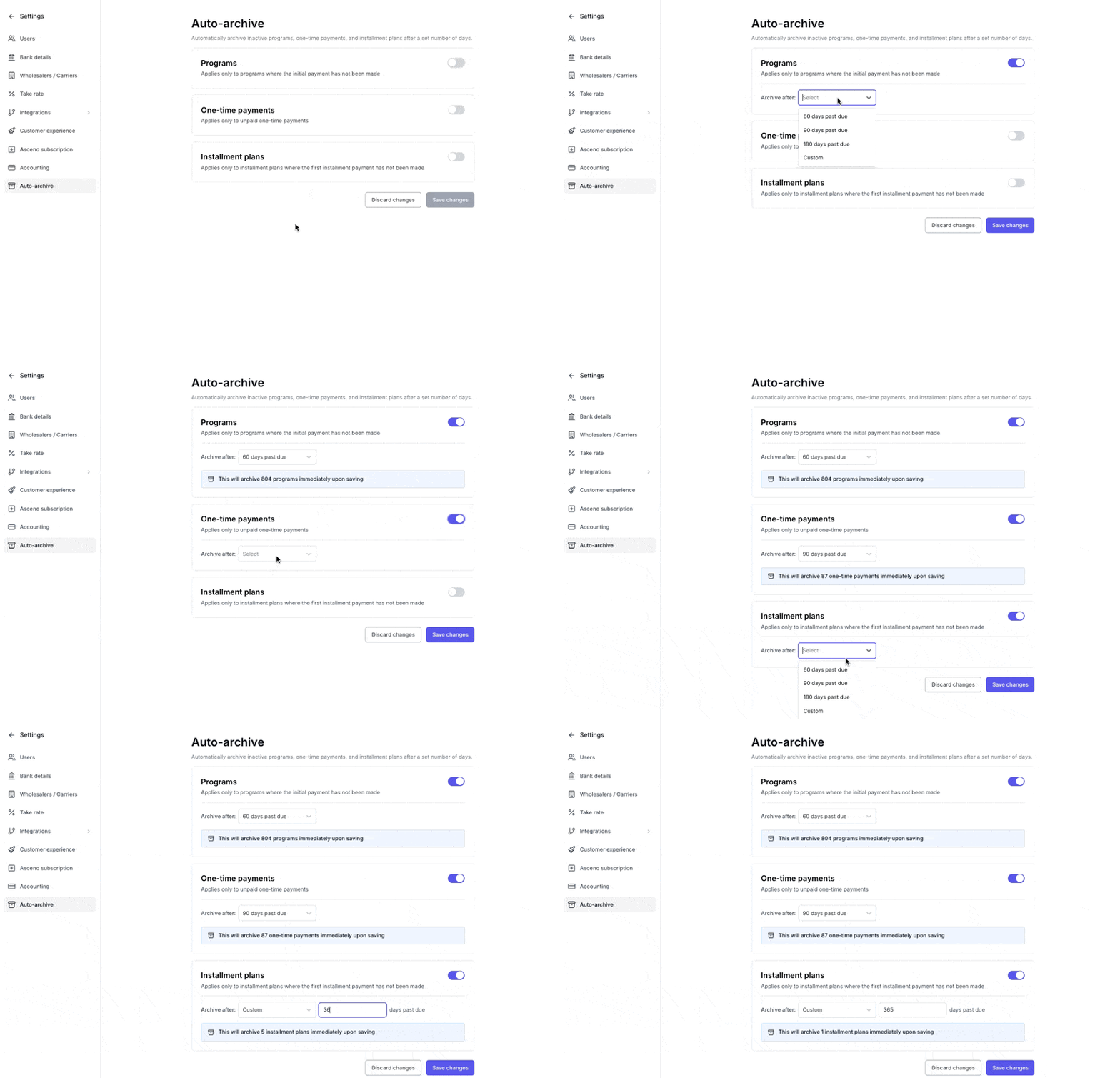
This feature is designed to help keep your dashboard clean by automatically archiving stale invoices according to a preset cadence.
The feature can be enabled independently by invoice type (Programs, One-Time Payments, Installment Plans, Premium-Increasing Endorsements).
This feature only affects unpaid invoices for unpurchased programs, one-time payments, installment plans, and premium-increasing endorsements. Monthly finance payments, recurring invoices for active installment plans, other endorsements, and reinstatements will not be automatically archived by this feature.
Enable Auto Archive
Auto Archive can be configured via settings, and is available to Admin and Accountant users. Producers and Support users do not have access to configure this feature.
Auto Archive can be enabled individually by Invoice Type (Programs, One-Time Payments, Installment Plans, Premium-Increasing Endorsements)
Each invoice type can be automatically archived according to a different cadence.
60 days past due
90 days past due
180 days past due
Custom (30 days or more)
Auto Archive for unpaid premium-increasing endorsements
Ascend can archive premium-increasing endorsements that were never paid, so they stop crowding AR Triage.
How to turn it on
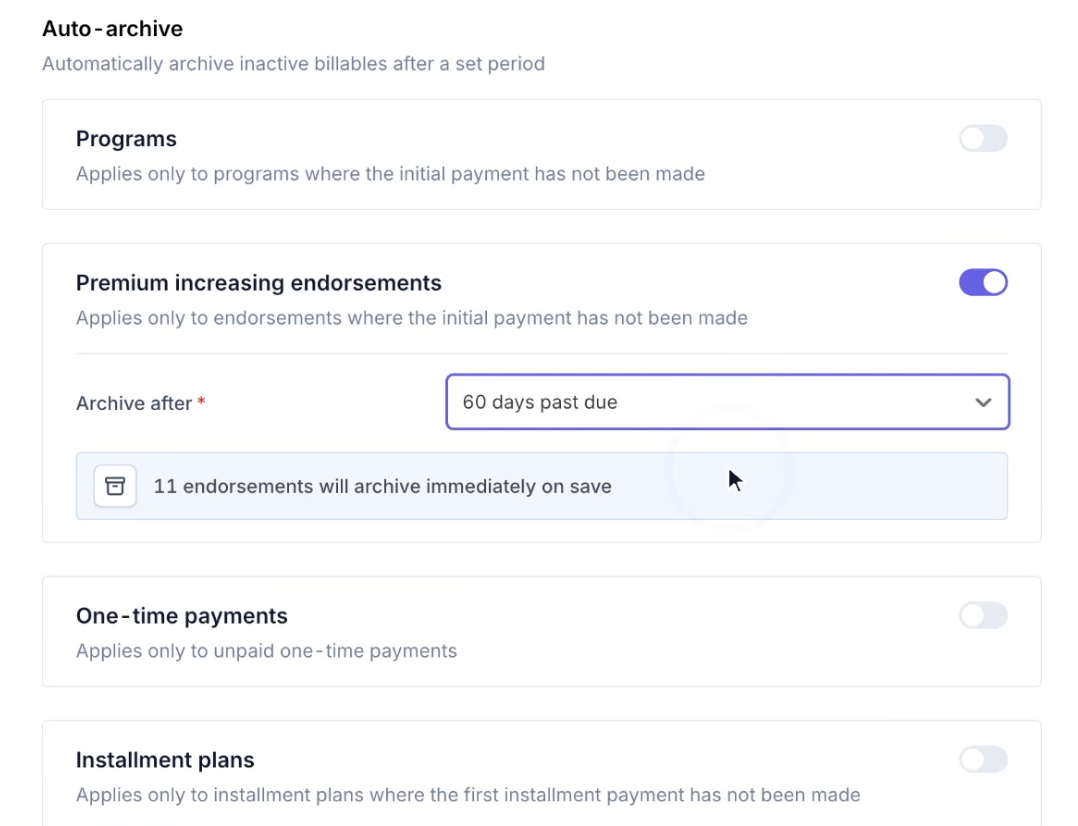
Go to Settings > Billing and Invoicing > Auto archive and use the Premium increasing endorsements card. Choose how far past due an unpaid endorsement must be before it's archived:
60 days past due
90 days past due
180 days past due
Custom (30 days or more)
Which endorsements get archived
An endorsement is archived only when all of the following are true:
It increases premium. Endorsements that don't increase premium are never auto-archived.
The invoice is completely unpaid. Any payment on the invoice, even a partial one, keeps it from being archived.
The invoice is past due by your chosen period. The period is counted from the invoice due date, not the date the endorsement was added. The minimum is 30 days.
The receipt hasn't been posted to your AMS. An endorsement whose receipt is already posted to your AMS is never archived.
When you save the setting, any unpaid premium-increasing endorsements that already meet these conditions are archived right away. After that, eligible endorsements are archived every night as part of regular auto-archiving.
Finding archived endorsements
Archived endorsements are removed from AR Triage but aren't deleted. You can still find them with the dashboard search bar.
Frequently Asked Questions
Can I set Auto Archive to run after fewer than 30 days?
Currently we do not allow auto archive to be set fewer than 30 days. This is a safeguard to prevent invoices from being accidentally archived before intended.
Can I see the invoices that are about to be archived?
There is currently no mechanism to directly view the invoices that will be archived when enabling or saving changes. Ascend recommends caution when enabling this feature.
How can I find archived invoices?
Any archived invoices can still be located via the dashboard search bar.
When does Auto Archive run?
Auto Archive runs every night. When you first enable or save a setting, invoices that already meet the past-due period are archived immediately.
What types of invoices will this feature archive?
This feature will only archive unpurchased programs, one-time payments, premium-increasing endorsements, and monthly installments in the Incomplete or Payment Due status.
Invoice Types unaffected by Auto Archive:
Overdue Monthly Installments for Financed Programs
Endorsements that do not increase premium
Reinstatements for Active Programs
Overdue Monthly Installments for Active Installment Plans
Contact Us
Need more help? Contact us at [email protected] for more help.