Direct Bill Insured Commissions + Reporting
Last updated: June 24, 2025
This is a guide that will teach you:
Why you may be receiving commission or emails regarding commission from Ascend
How Ascend's Direct Bill Insured feature works
How to access commission reporting in Ascend
Direct Bill Insured with Ascend
When you place a policy with an MGA or wholesaler that uses Ascend's Direct Bill Insured, your insured will pay use Ascend to pay MGA or wholesaler directly, instead of paying you/your agency.
Your insured will typically be offered the ability to pay in full or to finance their premium. More information on Direct Bill with Ascend can be found here.
When your insured makes their payment, you will automatically receive your commission from the MGA / wholesaler, deposited into your bank account. If you haven't yet set up your bank account in Ascend, click here to log in and do so.
If you can't access the link to update your bank account, you may not have the proper permissions. Please reach out to [email protected] and we can update your permissions.
Commission payout schedule is set by the MGA / wholesaler. Reach out to them to request a commission payout change. We have the following options for MGAs and wholesalers in our platform:
Payout Schedule | Payout Date (after policy is sold) |
Daily | 3p PST |
Weekly | Saturday |
Bi-weekly | 20th & 6th of each month |
Monthly | 6th of each month |
Once your commission is paid, we will also send you an email with an excel commission report attached, which can be used to reconcile the commission payment with the policies you placed.
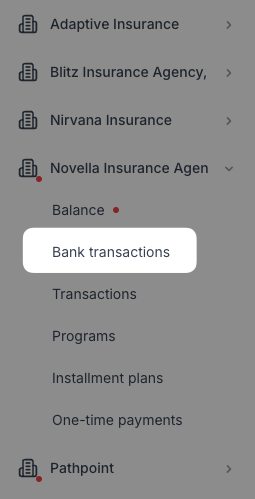
You can also view a breakdown in the Ascend dashboard, by visiting dashboard.useascend.com, navigating to the partner, and clicking "Bank Transactions":
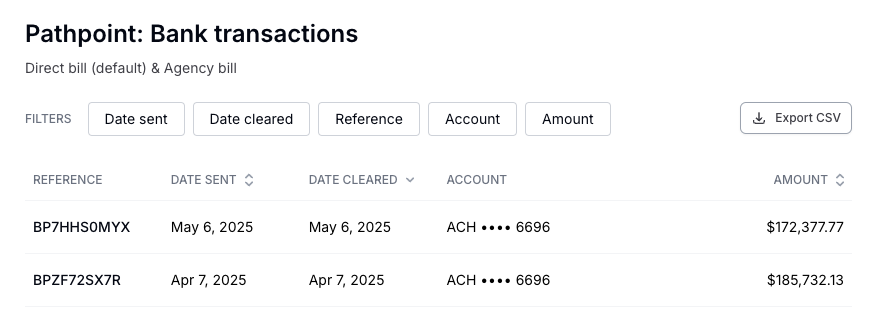
The Bank Transactions tab contains a list of all deposits made into your bank account:
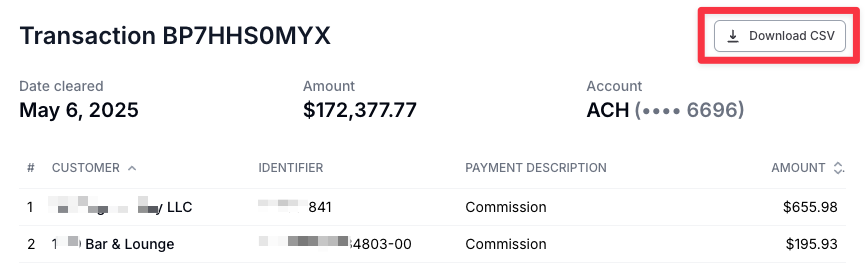
Clicking on a particular deposit will show you a list of all of the policies for which commission was paid, and allows you to download a CSV report:
Contact Us
Need more help? Contact us at [email protected] for more help.